Pre-requisite, setup, and tests
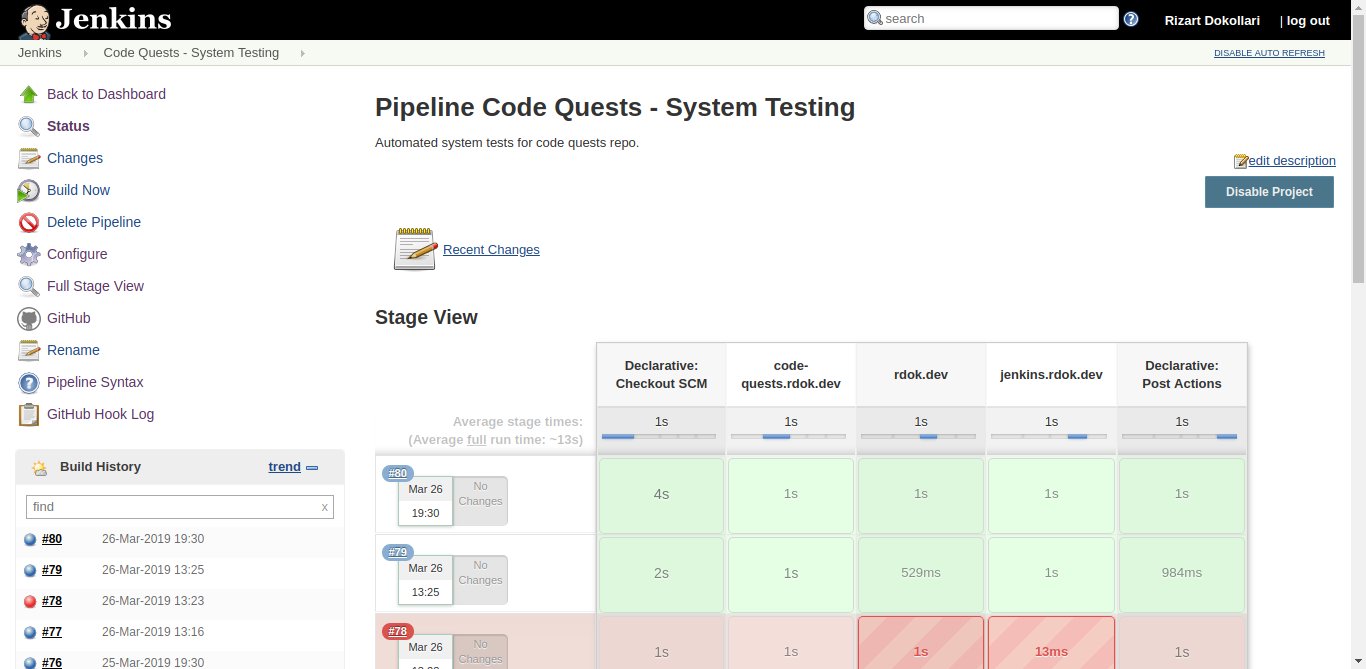
You’ve been given the quest to automate the process of maintaining a web server’s configurations.
Redirecting www to non-www pages, http to https pages, and a simple health check.
Completing this quest, rewards you with the automated testing process notifying you when the web server configurations misbehave.
You decide to complete this quest by setting up a Jenkins Pipeline. It will run the server tests, and notify you via emails.
Pre-requisites
Nginx, Jenkins, Docker, Jenkins SSH Credentials, Jenkins Secret text for webhook
Setup Pipeline
You login to your Jenkins server. Create a new item, name it, and select Pipeline type.
[ Jenkins -> New Item -> Pipeline & Name -> OK ]
You now find yourself on the configuration page.
- You tick the
Discard old buildscheckbox, to preserve disk space as your current environment has up to 20GB. You also select 30 days to keep builds, and up to 100 builds to keep. - You tick the
Do not allow concurrent buildsto maintain good server performance. - You tick the
Pipeline speed/durability/overridecheckbox, and select thePerformance-optimizedcustom pipeline level for fast builds. - You tick the
GitHub hook trigger for GITScm pollingcheckbox. Thus you enable the webhook feature. - You tick the
Build periodicallycheckbox- You insert
H 19 * * *so this piple to be executed daily at ~19:30
- You insert
- You select
Pipeline script from SCM, to instruct Jenkins to retrieve the Jenkinsfile from the source control.- You select
Gitas SCM, add the repository URL, and select credentials giving jenkins access to this repo.
- You select
- You finally click
Savebutton to complete the configuration.
Server Tests
Codeception is one of the most popular PHP testing Framework. It provides the ability to test web server configurations.
Since you want to test three configurations, you create three codecept test suites.
For example one of these tests verifies http://jenkins.rdok.dev redirects to https://jenkins.rdok.dev/
public function nonWwwHttpRedirectsToNonWwwHttps(Rdok_devTester $I)
{
    $I->wantToTest('non-www http redirects to non-www https.');
    $I->sendGET('http://jenkins.rdok.dev');
    $I->seeResponseCodeIsRedirection();
    $I->seeHttpHeader('Location', 'https://jenkins.rdok.dev/');
}
Then you create the Jenkinsfile that will execute these three testing suites.
Jenkinsfile
pipeline {
    environment {
        AUTHOR_EMAIL = """${sh(
            returnStdout: true,
            script: 'git show -s --format="%ae" HEAD | sed "s/^ *//;s/ *$//"'
        )}"""
    }
    agent {
        docker {
            image 'codeception/codeception:2.5.2'
            args '''
                --volume="$PWD:/app"
                --workdir=/app
                --entrypoint=''
            '''
        }
    }
    stages {
        stage('code-quests.rdok.dev') {
            steps {
                sh 'codecept run codequests_rdok_dev --no-colors'
            }
        }
        stage('rdok.dev') {
            steps {
                sh 'codecept run rdok_dev --no-colors'
            }
        }
        stage('jenkins.rdok.dev') {
            steps {
                sh 'codecept run jenkins_rdok_dev --no-colors'
            }
        }
    }
    post {
        failure {
            mail (
                to: "${AUTHOR_EMAIL}",
                subject: "❌ ${BUILD_TAG} - Failure",
                body: "Job Url: ${env.JOB_URL}"
            )
        }
        success {
            mail (
                to: "${AUTHOR_EMAIL}",
                subject: "✔ ${BUILD_TAG} - Stable",
                body: "Job Url: ${env.JOB_URL}"
            )
        }
    }
}
Finally, you instruct Jenkinsfile to notify the author of the latest commit with the status of the tests. Initially you planned to use a local mail server, however with the Gmail being quite picky, and blocking the mails, you decided to use Mailgun smtp instead.
Summary
In this quest, you managed to setup a Jenkins Pipeline that:
- Executes daily, or through GitHub WebHooks
- Jenkins pulling the new code from the GitHub
- Jenkins triggering the Pipeline
- Pipeline verifying the behavior for each of the different web server configurations.
- Pipeline notifying the author of the commit used for testing